From a property listing to a finished reel
This system takes one property listing and turns it into a short vertical video: a presenter walks through the home and talks to camera, with cutaway clips of the rooms in between. The two kinds of clip are made by two separate prompt writers that run side by side: one for the presenter (A-roll), one for the rooms (B-roll). They share a start, a toolkit and a finish. Most of the work is planning and writing instructions for an AI video model called Seedance. A person approves every step that costs money. Each part has a short codename; click any box to see what it does.
Words used on this page
- Prompt
- The written instructions sent to the video model for one clip.
- Reference
- A photo, video or sound file handed to the video model alongside the prompt, so it copies the real thing instead of inventing it.
- A-roll
- Presenter shots: the presenter on screen, talking, in one photographed room, in one unbroken take.
- B-roll
- Room clips: camera moves through a room with no person in it, shown while the voice keeps playing.
- Pack
- One B-roll video job: several 2-second room shots joined by hard cuts, 6, 8 or 16 seconds long.
- Block
- One sentence group of the voice, 4 to 10 seconds. One presenter take per block; room clips cut in over it.
- Viewpoint
- Where the camera stands, which way it points, how wide it sees, and how it moves.
- Jerel
- The human director who approves words, prompts and spending.
Status
Show or hide by status:
Honest note: the parts are built, but no reel with the current presenter has yet gone all the way from listing to finished video and been approved by a person. The current presenter recipe has never rendered a frame, and no room clip has been collected under today's spending checks.
The flow
A shared start, then two lanes that run at the same time, then a shared finish. Codenames follow a film-set theme: each part is named after the crew job it does. On a phone everything stacks top to bottom.
Presenter lane (A-roll)
One presenter, one room photo, one block of the voice, one continuous take with its own speech. A model writes the acting; code builds the rest.
Room-clip lane (B-roll)
No person, no sound. Code prints the camera instructions from rules; a reviewer model reads them against the photos before any money is spent.
Same or different?
How the two prompt writers compare. "Shared" means one piece of the system serves both lanes, not two copies.
| Presenter lane (A-roll) | Room-clip lane (B-roll) | Same? | |
|---|---|---|---|
| Inputs used | One cleaned room photo, the photo's item list, the outfit photo, the presenter's silent video, optionally six face photos, the voice recording and its word-by-word transcript, and the director's draft shot card. | Cleaned room photos (a pack can cut between several rooms), the landmarks and keep-or-drop list from the photo reading, and the order of cutaways. Photos only: no person, no sound. | Partly: same cleaned photos and photo reading |
| Who writes the prompt | Mostly code: a fixed template filled from typed choices. One creative writing call (Opus 5.5) writes the acting, after a vision check has confirmed every object it names. | Code only. The words are printed from rules; no model writes them. A reviewer model (Sonnet) only reads and passes or fails them. (A separate draft-preview route that Jerel asks for by name does use a model call, for drafts only.) | Different |
| Checks before spend | Object-by-object photo check (a hard stop), spoken claims checked against the listing facts, reference fingerprints, the "does the presenter move" check, then a read-only rerun of every submit check. | Prompt rules check (length, banned camera words), headroom check on every turn, "is each shot new" check, the reviewer model (fails closed, at most two rewrite rounds), a "was this exact shot already paid for" check, then a read-only rerun of the sealed bundle. | Different checks, same final gate |
| Audio | The clip carries its own generated speech, driven by the voice recording. The presenter video is muted first so the voice is the only sound. | Silent clip. It plays under the voice as a cutaway, or against music when the reel has no presenter. | Different |
| Shot structure | One continuous take, 4 to 10 seconds, one block. No cuts, no multi-shot. | Multi-shot: 2-second shots joined by hard cuts. 6 s = 3 shots, 8 s = 4, 16 s = 8. At least two shots per room. One exception: a single unbroken 4-second take. | Different |
| Camera moves allowed | Hold, follow, lead, snap zoom. No turns, orbits or cuts. | Push in, turn left or right, slide left or right (the slides have never been rendered, so they are unproven). Banned: orbits, drone rises, whips, zooms, shake, pulling back. | Different menus, one shared rulebook |
| Lens, height, camera spot | Wide (84°) or normal (47°). Chest height by default, eye height allowed. Can later step onto a checked spot on the visible floor. | The photo's own perspective, no chosen lens. Standing eye height. Always the photo's own camera spot. | Different |
| What is shared | The cleaned photos (PLATES) and the one photo reading (ATLAS); the viewpoint logic (SURVEYOR), which already prints the room clips' crop, lens and move wording and lists every valid angle for both lanes; the request clerk (CLERK); the spending gate (TOLLGATE); the dashboard (VILLAGE); the same Seedance model and account; the cut on the voice clock (CUTTING ROOM). | Shared | |
| What the in-progress work changes | A lot. The director now hands over a draft shot card (SKETCH). The one typed shot card (CALL SHEET), the automatic checks (CONTINUITY) and the revision loop (RETAKE) are all being built for this lane first. | Little so far. The move onto the shared viewpoint logic is done and changed no output. The room clips do not get the shot card, the new checks or the revision loop yet; that is SECOND UNIT ROADMAP. | Presenter lane first |
The moving pieces (variables)
Everything that can change inside one shot taken from one listing photo. The choices differ by lane, so pick one. The choices multiply; tick or untick a row to see the raw count. Raw counts are illustrative: they show how choices multiply before the checks throw out the impossible ones (a turn toward a side of the photo with nothing in it, say).
Worked example: the test listing's living-room photo
| What is chosen | Room clip (B-roll) | Presenter shot (A-roll) |
|---|---|---|
| Aim: which slice of the photo the tall phone frame shows (six positions, left to right) | 6 | 6 |
| Lens | 1 (photo's own) | × 2 (wide, normal) |
| Camera height (a low camera is refused: it would see surfaces the photo never showed) | 1 (eye) | 1 (chest) |
| Camera spot (today) | 1 (photo's own) | 1 (photo's own) |
| Camera move | × 5 | × 4 |
| Raw camera combinations, before checks (illustrative) | 30 | 48 |
| Camera angles SURVEYOR actually lists after its checks (real) | 14 | 24 |
| What the presenter does: talk in place, point something out, walk toward camera, walk away | n/a | × 4 |
| Camera feel: steady rig or handheld, none, slight or noticeable shake BEING BUILT | n/a (always smooth) | × 6 |
| Where the presenter stands, 3 across × 3 deep ROADMAP | n/a | × 9 |
| New camera spots on the visible floor, say 3 plus the original ROADMAP | n/a | × 4 |
The real list is not a simple slice of the raw count: it counts each landmark a move can head for as its own angle, then drops everything a check refuses (for example every turn toward a side with nothing photographed past it). Across all 18 photos of the test listing, SURVEYOR lists 312 room-clip angles and 518 presenter-shot angles. Those real counts cover the camera only; presenter actions, camera feel and standing spots multiply on top, and those multiplied totals are illustrative, not a number the system reports.
Codename legend (every part on one list)
| Codename | Where | What it does | Status |
|---|
Every video prompt is built from pieces. Each piece is written by one of three authors:
Everything below is the real saved text, shown as it was written. Only private details are hidden.
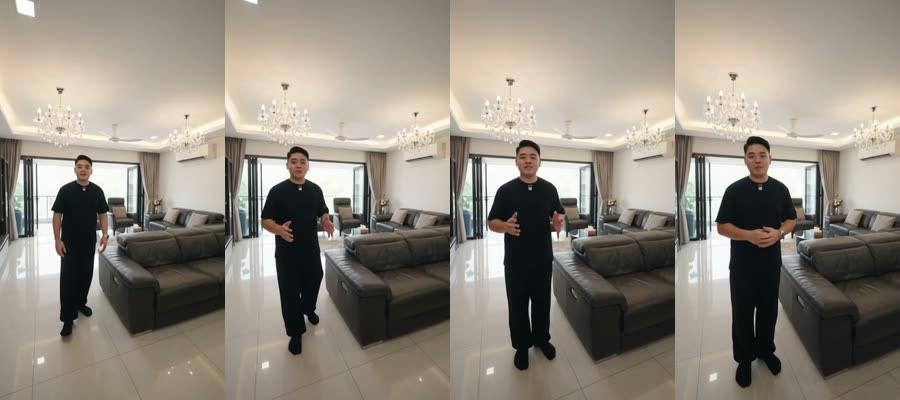
Example 1 — a presenter video
Ernest in a living room, saying the first line of your script.
The planner decides the shot
Two saved planner answers. Ernest walks toward the camera in the living room.
The planner split the 5-second line into three shots. Its own wording, unchanged.
| Shot 1 · when | 0s to 1.3s, presenter, photo 00 |
|---|---|
| What it shows | Open on the supplied living-room plate: place Ernest on the visible glossy floor left of the sectional, medium-wide toward camera with the chandeliers, seating, and glazing behind; verify placement before motion. |
| Why | Open the reel and establish the accepted price-ranking statement through narration. |
| Shot 2 · when | 1.3s to 3.3s, room, photo 04 |
| What it shows | Start wide on the white facade and gate; make one slow upward drift across the balconies and glazing, ending on the stacked architecture without emphasizing the address plaque. photo 00 remains excluded for the supplied residual watermark lettering. |
| Why | Ground the opening claim in the actual property exterior. |
| Shot 3 · when | 3.3s to 5s, presenter, photo 00 |
| What it shows | Return to the same visible living-room floor left of the sectional, medium-wide toward camera with the glazing behind; finish with a small closing gesture. |
| Why | Complete the accepted opening claim without asking the exterior still to prove it. |
A second planner call joined shots 1 and 3 into one walking take.
| Kind | walk |
|---|---|
| Direction | forward |
| Stance | staggered-weight |
| Gesture | conversational-palms |
| Manner | readable-three-quarter |
| Camera | gives-ground |
| Camera status | pending placement |
| Why this room | The bright living room has visible glossy tiled flooring and open glazed areas, supporting a forward introduction through the seating scene. |
| Start | Begin with the sectional seating, coffee table, and glazed openings in view. |
| End | Advance across the visible tiled floor with the seating and outdoor area beyond the glass anchoring the scene. |
The AI writes the movement lines
The one AI call in this prompt. Left: what it was given. Right: what it wrote back.
The program assembled this. The ask comes from the planner's words.
| Spoken line | YOU This is one of the cheapest freehold semi-D in Singapore. |
|---|---|
| Ask | PROGRAM Keep walking. Previs composition: Start: Begin with the sectional seating, coffee table, and glazed openings in view; end: Advance across the visible tiled floor with the seating and outdoor area beyond the glass anchoring the scene; direction: forward; camera intent: gives-ground; camera status: pending placement. |
| Moves it may use | PROGRAM conversational-palms: loose open palms rise and release with the phrasing, aimed at nothing in the room; open-palm-indicate: an open palm indicates one feature the inventory lists, without touching it; step-or-lean-to-camera: a small step or lean toward the camera, then back to the stance; three-quarter-glance: a three-quarter glance away from the lens and back to it; weight-shift-settle: the weight shifts onto the other leg and the stance settles again |
| Outfit | PROGRAM black tee, black trousers and black shoes |
| Length | PROGRAM 5 seconds |
| Program's draft · First frame | PROGRAM Ernest is already walking forward toward the camera from the far open section of the glossy white tiled living-room floor between the glazed openings and the sectional sofa, feet naturally staggered. |
| Program's draft · Movement | PROGRAM Continue one unhurried walk forward toward the camera on the photographed glossy white tiled living-room floor in the open center aisle toward the nearer open section of the glossy white tiled living-room floor, clear of the sectional and coffee table. The walk stays within the verified visible floor route; no doorway crossing or adjacent-room reveal. At the final frame the walk is still in progress, one foot carrying weight while the other continues the step; feet remain naturally staggered. |
| Program's draft · What he does | PROGRAM The free hand uses relaxed upward and downward open-palm conversational gestures, without pointing at room features. Fingers stay loose. The hand releases naturally between phrases; it does not mime each word, repeat a waist-to-shoulder cycle, or stay in perpetual motion. The face and unobstructed mouth remain readable while speaking. Brief natural glances return to the viewer; shoulders can lead the body rhythm with the face in three-quarter view toward the camera. |
| Program's draft · How much of him is in frame | PROGRAM The opening full-body scale follows the verified placement: approximately 43 percent of frame height. The coordinated camera travel keeps that opening scale approximately stable. |
| Program's draft · After the last word | PROGRAM the walk continues naturally through the final frame, without an arrival pose or feet-together stop. |
| Program's draft · Camera | PROGRAM Handheld phone at chest height, level horizon, natural slight operator shake, with the presenter’s face and mouth readable inside the photographed scene. The camera backs away with the presenter at a coordinated pace, keeping the opening presenter scale approximately stable; it is still moving at the final frame. |
| Fixed rules text | PROGRAM 8,131 characters, the uncoloured parts of the prompt on the left |
Its six lines went into the prompt word for word.
| First frame | Ernest is already walking forward toward the camera on the open glossy tiled floor between the glazed openings and the sectional seating, feet naturally staggered, with the sectional seating, coffee table and glazed openings in view. |
|---|---|
| Movement | Ernest stays on the open glossy tiled floor between the glazed openings and sectional seating for the whole take, continuing one unhurried forward walk toward the camera with alternating steps and naturally staggered feet; at the last frame one foot carries the weight while the other advances. |
| What he does | The forward walk carries Ernest across the open glossy tiled floor between the glazed openings and the sectional seating, shifting weight into the next step and ending this beat still advancing with his feet staggered. As the walk continues, his eyes make one brief three-quarter glance toward the glazed openings, then return to the lens while his head follows the glance and turns back toward the camera. |
| How much of him is in frame | Keep Ernest head to toe with both feet on the photographed glossy tiled floor, at a medium-wide scale that leaves the sectional seating, coffee table and glazed openings visible around him. |
| After the last word | the forward walk carries on through the final frame, with the feet continuing into the next alternating step. |
| Camera | The handheld phone keeps a level horizon with natural small operator shake and backs away at the presenter's forward walking pace, keeping his face and mouth readable as the photographed room stays within the frame; the retreat continues through the final frame. |
| Tension it noticed 1 | The ask says "Keep walking" while the settled plan adds a three-quarter glance: the glance is brief and happens during the forward step, so the walk remains continuous. |
| Tension it noticed 2 | The forward walk requires the camera to give ground while the frame must retain Ernest and the photographed room: the phone retreats with him at a coordinated pace and stays within the source composition. |
| Tension it noticed 3 | The template lets @Video1 supply natural mannerism character while VISIBLE ACTION owns gaze: the visible-action slot explicitly owns the glance and return, leaving @Video1 to supply only the presenter's natural character. |
The writer builds the final prompt
The full prompt exactly as saved. The shading shows who wrote each part.
【GENERATION GOAL】
Generate Ernest's speech and synchronized lip movements from @Audio1 while preserving the photographed source plate as one continuous take. Generate Ernest's speech and synchronized lip movements, matching the voice, delivery, pronunciation and cadence in @Audio1. This is a generation, not an edit of any reference.

【REFERENCE ASSET ROLES】
@Image1 — the LOCATION: Bright furnished interior seating area with glossy light-colored tiled flooring, large glazed openings, and an outdoor area visible beyond the glass. The plate alone supplies the visible location, geometry, materials and atmosphere; it is an illustrative room or exterior view. It supplies geography, architecture, materials and light. LOCK the lighting to this reference: light direction, time of day and atmosphere come from @Image1 alone and never change.
@Image2 — the ATTIRE STILL: Plain attire photograph documenting a black tee, black trousers and black shoes. It supplies wardrobe and build only, not identity. Do not use its background, lighting or scene.
@Video1 — the IDENTITY AND BEHAVIOR REFERENCE: real footage of Ernest speaking to camera. It supplies real Ernest presenter with natural facial articulation and relaxed on-camera mannerisms, skin texture and appearance, plus the presenter's facial articulation, mouth amplitude, expression transitions, blink cadence and relaxed head-and-shoulder mannerisms. Its setting, framing, wardrobe, words, lighting, exposure, colour grade, contrast and softness are not part of this shot — @Video1 contributes identity and motion only, never picture style.
@Audio1 — the SPEECH: Local WAV reference from the exact accepted voice-timing window for this block; it carries Ernest's speech timing and a quiet padded tail only. Only its sound enters this generation: no music, no sound effects.

【SUBJECTS】
Ernest maps to @Video1 — real Ernest presenter with natural facial articulation and relaxed on-camera mannerisms — wearing the wardrobe of @Image2: black tee, black trousers and black shoes. One Ernest, existing once. The presenter's articulation and mannerisms follow @Video1.
The scene is @Image1 and nothing else: Bright furnished interior seating area with glossy light-colored tiled flooring, large glazed openings, and an outdoor area visible beyond the glass. Visible items: L-shaped dark leather sectional sofa on the right; Additional dark sofa seating near the center-right; Low dark coffee table in front of the seating; Small side tables and stacked items beside the seating; Light wood sideboard along the left wall; Two crystal chandeliers hanging from the ceiling; Ceiling-mounted cassette air-conditioning unit; Recessed ceiling lights; Full-height curtains around the glazed openings; Framed artwork on the right wall; Dark interior door on the rear wall; Outdoor table, chairs, and umbrella visible through the glass; Trees, landscaping, and neighboring structures visible outside. Every object in frame appears in @Image1 or on Ernest's references. One generic living room.

ENVIRONMENTAL MOTION CONTRACT — Nothing in the room moves or changes state unless a beat operates it, and the effect of operating it stays within that object. Ernest and the presenter's own cast shadow move naturally.

【THE SPEECH — @Audio1 IS THE SOUND LAW】

CARRIER: @Audio1 is a voice audio file — it has no picture. Every frame of the output shows this generic living room and Ernest at full brightness, first frame to last, opening and closing on the picture with no fade.

MASTER AUDIO: Ernest says exactly: "This is one of the cheapest freehold semi-D in Singapore."

WORDS OF THIS BLOCK (as heard in @Audio1 — the FILE is the truth): "This is one of the cheapest freehold semi-D in Singapore."

PRONUNCIATION — Say natural Singapore English delivery, preserving the accepted words exactly.

ROOM VOICE — Natural quiet room tone under Ernest's generated speech; no music or sound effects.

MOUTH OWNERSHIP: every audible word belongs to Ernest, and that is the only mouth in frame. The presenter speaks these words and nothing else — no ad-libs, no "uhm", no second voice, no echoed repeat of the words.

TAIL: when the last word ends, the presenter's mouth closes and the face stays alive — the blink cadence continues and the eyes go where VISIBLE ACTION puts them — and the forward walk carries on through the final frame, with the feet continuing into the next alternating step. The picture fills the requested duration without truncating speech.

FORMAT — ONE CONTINUOUS TAKE. The speech runs the length of @Audio1, and any remaining picture after the stem ends stays quiet to the final frame. Real time.

LOCATION MAP — The visible source layout places the visible glossy floor left of the dark sectional in relation to the chandeliers, seating and glazing. Preserve the source edges, depth and screen-left/screen-right relationships. Frame-left stays frame-left within this one continuous take.

FRAMING — 9:16 vertical inside the photographed room. a medium-wide view toward camera with the chandeliers, seating and glazing behind. Keep the composition within the photographed source plate. The visible scene is limited to this source inventory: Bright furnished interior seating area with glossy light-colored tiled flooring, large glazed openings, and an outdoor area visible beyond the glass. Visible items: L-shaped dark leather sectional sofa on the right; Additional dark sofa seating near the center-right; Low dark coffee table in front of the seating; Small side tables and stacked items beside the seating; Light wood sideboard along the left wall; Two crystal chandeliers hanging from the ceiling; Ceiling-mounted cassette air-conditioning unit; Recessed ceiling lights; Full-height curtains around the glazed openings; Framed artwork on the right wall; Dark interior door on the rear wall; Outdoor table, chairs, and umbrella visible through the glass; Trees, landscaping, and neighboring structures visible outside. Keep only edges, structure and floor that @Image1 actually shows; never invent an object, surface, wall or depth to satisfy the composition. @Image1 remains the authority for geometry, materials, light and atmosphere.

OFF-SCREEN LOCK — Ernest is the only person in frame. Ernest is the only person on camera and the only audible speaker.

HEIGHT RULER — Keep Ernest head to toe with both feet on the photographed glossy tiled floor, at a medium-wide scale that leaves the sectional seating, coffee table and glazed openings visible around him.

FIRST FRAME AND BLOCKING — Ernest is already walking forward toward the camera on the open glossy tiled floor between the glazed openings and the sectional seating, feet naturally staggered, with the sectional seating, coffee table and glazed openings in view. The audio alone determines mouth state at frame zero; the mouth follows the actual start of speech, including speech at time zero.

MOVEMENT CONTRACT — Ernest stays on the open glossy tiled floor between the glazed openings and sectional seating for the whole take, continuing one unhurried forward walk toward the camera with alternating steps and naturally staggered feet; at the last frame one foot carries the weight while the other advances.

VISIBLE ACTION — The forward walk carries Ernest across the open glossy tiled floor between the glazed openings and the sectional seating, shifting weight into the next step and ending this beat still advancing with his feet staggered. As the walk continues, his eyes make one brief three-quarter glance toward the glazed openings, then return to the lens while his head follows the glance and turns back toward the camera. Blinks, breath and micro-saccades remain naturally alive through the final words and quiet tail, taking their character from @Video1. The selected actions govern hands, gaze and travel; @Video1 supplies their natural character, not a different route.

CAMERA — The handheld phone keeps a level horizon with natural small operator shake and backs away at the presenter's forward walking pace, keeping his face and mouth readable as the photographed room stays within the frame; the retreat continues through the final frame. Keep all revealed edges, surfaces and depth within @Image1. Natural phone rendering, straight lines straight at the frame edges.

PHYSICS — Natural human body motion; the photographed architecture, surfaces and visible objects retain their source geometry throughout the take. Skin keeps its own texture and pores.

LIGHTING & VISUAL CONSISTENCY — Light, softness, contrast, exposure and colour balance derive strictly from @Image1 and nowhere else: match the photo's interior light exactly — @Image1 alone defines the light direction, time of day, softness, exposure, colour balance and atmosphere., one coherent direction. No relight, no added sun, no beauty key, no rim light. Lighting follows @Image1, the location — do not inherit lighting from @Image2 or @Video1. Exposure holds on the presenter's face through the take. Do not import the other references’ lighting, colour grade, contrast, softness or sharpness onto the presenter or the scene — @Video1 is identity and motion only; the generated picture's entire photographic character comes from @Image1.

AUDIO — The soundtrack is Ernest's speech from @Audio1 — the same voice saying the same words with the same timing, heard in the natural acoustic of this generic living room — and nothing else. No music, no sound effects, no added ambience bed, no subtitles.
What the video model made from this prompt
This prompt was never rendered. The only clip of this shot came from an earlier prompt.
Example 2 — a room video
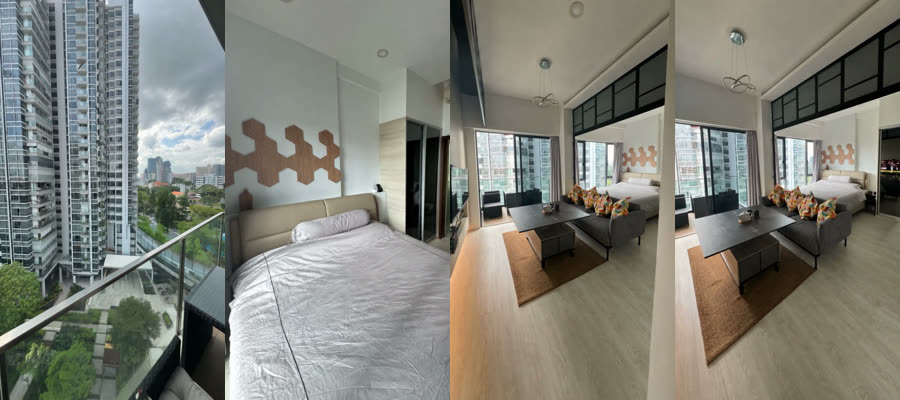
One 6-second clip moving through three rooms of a condo.
The room shots are picked
Three rooms, two seconds each. An AI had described each photo first.
Set by hand for this test. No planner ran.
| Planned by | hand-planned |
|---|---|
| Why | sample-video shape: one Seedance job, three rooms, 2.0s each, 6.0s total. The tier planner takes its budget from tier durations (short=16.0) and applies min shots per room=2, which yields 8 shots across 2 packs and contradicts the sample-video skill's one shot and one camera direction per room. Rooms: balcony 10, bedroom 07, living 02. The pre-spend critic rejected kitchen 06 (built-in microwave) and bathroom 09 (a small hand towel) as low-value camera destinations; 02 is the highest-worth remaining plate and carries real furniture mass. |
| Clip length | 6.0 seconds |
| Room 1 | balcony, photo 10, 2.0 seconds |
| Room 2 | bedroom, photo 07, 2.0 seconds |
| Room 3 | living, photo 02, 2.0 seconds |
| Photo ranking | kept 7, dropped 6; worth scores photo 10 0.92, photo 07 0.86, photo 06 0.68 |
The program writes the whole prompt
No AI writes this prompt. The orange words are room descriptions an AI wrote earlier.
REFERENCES AND DURATION
Inputs: @Image1 (balcony listing photo; the only reference for this viewpoint); @Image2 (bedroom listing photo; the only reference for this viewpoint); @Image3 (living room listing photo; the only reference for this viewpoint) — 3 photographed viewpoints.
Duration: 6.0 seconds total, 3 shots, 2 hard cuts. 9:16 vertical.

SCENE CONTEXT
Daylight multi-room listing walkthrough covering balcony (@Image1) and bedroom (@Image2) and living room (@Image3); hard cuts between photographed rooms, no invented corridors.

ACTIVE REFERENCES
@Image1: source of truth for balcony geometry, furniture, materials, colors, views, and lighting.
@Image1 is the only reference for this viewpoint; infer no unseen geometry and stay inside the source photo's visible space.
@Image2: source of truth for bedroom geometry, furniture, materials, colors, views, and lighting.
@Image2 is the only reference for this viewpoint; infer no unseen geometry and stay inside the source photo's visible space.
@Image3: source of truth for living room geometry, furniture, materials, colors, views, and lighting.
@Image3 is the only reference for this viewpoint; infer no unseen geometry and stay inside the source photo's visible space.

ROOM MAP
@Image1 BALCONY:
- SCREEN-LEFT (Background): two tall curved condominium towers of stacked balconies filling the left half of the view.
- CENTER (Foreground-to-Mid): a frameless glass balustrade with a slim metal handrail running across the balcony edge, a black rattan table with a glass top standing in the middle of the balcony, two black rattan armchairs with cream seat pads and dark floral-print scatter cushions, one either side of the table.
- OVERHEAD / CEILING (Foreground): a black conical pendant light hanging from the balcony soffit at the top of the frame.
The curved condo towers ends at @Image1 screen-left boundary; nothing exists beyond it. The photographed extent ends at the @Image1 screen-right boundary; nothing exists beyond it. The photographed extent ends at the @Image1 screen-top boundary; nothing exists beyond it. The photographed extent ends at the @Image1 screen-bottom boundary; nothing exists beyond it.
@Image2 BEDROOM:
- SCREEN-LEFT (Mid): a scattered arrangement of timber hexagon panels climbing the wall above the headboard, a wide cream padded leather headboard running along the left wall.
- FAR CENTER (Background): a pale timber-slatted panel wall beside the wardrobe.
- CENTER (Foreground-to-Mid): a made double bed under a creased white bedspread with a dark piped edge and a long bolster at the head, a small black bracket mounted on the wall at the head of the bed with a cable running down from it.
The timber hexagon wall panels ends at @Image2 screen-left boundary; nothing exists beyond it. The photographed extent ends at the @Image2 screen-right boundary; nothing exists beyond it. The photographed extent ends at the @Image2 screen-top boundary; nothing exists beyond it. The photographed extent ends at the @Image2 screen-bottom boundary; nothing exists beyond it.
@Image3 LIVING ROOM:
- SCREEN-LEFT (Foreground-to-Far): a black-framed corner window wall on the left with grey curtains, looking onto neighbouring condo towers, dark rattan seating and a table on the balcony visible through the left glazing, a dark square table in the foreground holding a small white teapot and two cups.
- CENTER (Foreground): a low dark storage cabinet on castors tucked under the square table.
- OVERHEAD / CEILING (Mid): a looped-ribbon pendant on a slim cord hanging high in the upper left of the frame.
The corner window wall ends at @Image3 screen-left boundary; nothing exists beyond it. The photographed extent ends at the @Image3 screen-right boundary; nothing exists beyond it. The photographed extent ends at the @Image3 screen-top boundary; nothing exists beyond it. The photographed extent ends at the @Image3 screen-bottom boundary; nothing exists beyond it.
Reflective surfaces show reflections only; screens stay off and dark.

SOURCE FRAMING
Each interval is a full-height 9:16 crop of its source photo; discard width, never squeeze. Top/bottom are source frame boundaries; interval edges are named below. Keep circles, lines, and scale true.

MULTI-ANGLE FROM ONE PHOTOGRAPH
Each shot runs at most 2 seconds and ends on a hard cut at a named whole-second mark. The only exception is one continuous take with no cuts, which runs 4 seconds.
Two shots of one photograph are two framings of the same photographed viewpoint, never a second camera position and never a second room.
Each shot names its own framing and its own camera direction, and no two shots of one photograph share both.
Each shot names what its left vertical edge cuts, what its right vertical edge cuts, and what sits at screen-top and screen-bottom. Every named edge is an object visible in that photograph.
Each shot names what enters frame and from which edge, and names the furthest the frame may travel; nothing exists beyond it.
One pace word per shot. Do not repeat a speed or distance restraint inside a shot.
Reveal only photographed room content. Do not invent unseen walls, floors, rooms, furniture, décor or reverse sides, and no new room detail or hidden viewpoint appears.

POV AND VISIBILITY LOCK
Start at each source photo's entry viewpoint at standing eye height; move only through visible space in that photo. Keep behind-camera space and space beyond source edges out of view. No new doors, windows, walls, or rooms; no ceiling above or floor below the captured extent. Never interpolate through unphotographed space between rooms.

FORMAT MODE
CONTROLLED MULTI-SHOT SEQUENCE. New named-edge crop at each cut; each cut changes crop position or camera direction; landmark per interval. HARD CUT only. No fades or dissolves.

CAMERA PATH
0s-2s: Fresh left full-height crop of @Image1; top-left vertical edge is the @Image1 screen-left boundary; farthest frame-right cuts the glass balustrade; screen-top/bottom are @Image1 source frame boundaries. Start: curved condo towers upper screen-left, glass balustrade screen-right. Already moving in a slow in-place pan left toward the curved condo towers; keeping the curved condo towers in frame; the curved condo towers is the furthest the camera turns and nothing beyond it enters frame; do not fly to a new subject; finishes on the curved condo towers; do not close in; move at one even constant speed from first frame to last, with no acceleration, deceleration, ease-in, ease-out, or speed ramp. End: curved condo towers remains readable with surrounding photographed room still visible.
At the 2-second mark: HARD CUT to @Image2; do not interpolate viewpoint.

2s-4s: Fresh left full-height crop of @Image2; top-left vertical edge is the @Image2 screen-left boundary; farthest frame-right cuts the cream padded headboard; screen-top/bottom are @Image2 source frame boundaries. Start: timber hexagon wall panels screen-left, cream padded headboard screen-right. Slow slide right past the timber hexagon wall panels; the camera travels straight sideways while the lens holds its forward bearing and does not pan to track the timber hexagon wall panels; do not fly to a new subject; do not close in; move at one even constant speed from first frame to last, with no acceleration, deceleration, ease-in, ease-out, or speed ramp. End: timber hexagon wall panels remains at screen-left with surrounding room still visible.
At the 4-second mark: HARD CUT to @Image3; do not interpolate viewpoint.

4s-6s: WIDEST full-height crop of @Image3; top-left vertical edge is the @Image3 screen-left boundary; farthest frame-right is the @Image3 screen-right boundary; screen-top/bottom are @Image3 source frame boundaries. Start: corner window wall upper screen-left, balcony seating beyond the glass upper screen-left, looped chrome pendant screen-center. Slow gimbal walk toward the bed with cream padded headboard; keeping the bed with cream padded headboard in frame; do not fly to a new subject; stop before its near face; move at one even constant speed from first frame to last, with no acceleration, deceleration, ease-in, ease-out, or speed ramp. End: bed with cream padded headboard remains at screen-center with surrounding room still visible.

OPTICS
0s-2s: 84° wide rectilinear, deep focus; 2s-4s: 47° standard-normal, deep focus; 4s-6s: 84° wide rectilinear, deep focus. Level camera, straight verticals; no fisheye, dutch angle, or lens drift.

MOTION
Gimbal-stabilized and level, with no shake, sway, or footstep bounce. Each shot's camera move holds one even constant speed from first frame to last, bounded by the photographed space. No acceleration or deceleration. No ease-in. No ease-out. No speed ramp. The camera holds its stated move; photographed architecture stays true and stable. No zoom, optical or digital. Indoor: framing height and horizon stay constant for the whole shot.

LIGHTING
Match each source photo's daylight, shadows, color temperature, fixture states, curtains, and window state. Exposure stays constant; no relighting, grade, flare, or pumping.

AUDIO
No audio, no BGM, no subtitles.

FIDELITY LOCKS
Furniture, materials, colors, and floor pattern stay fixed to the active source photo.
Screens stay off with a dark blank screen.
Window views and reflections stay consistent.
No added furniture, décor, plants, rugs, or staging.
No added people. Do not invent pets or animals.
No on-screen text, logos, or watermarks.
Room proportions and scale stay fixed.


WORLD MOTION
If something already visible in the active source photo would move in real life, let it move at a natural pace. Do not freeze it. Do not add movers that are not already in the photo.
Cable cars or gondolas on a visible cable travel along that cable.
Vehicles on a visible road keep driving.
Boats or ships on visible water keep moving with the water.
Water has a light natural ripple where water is shown.
A fan or any other spinning object already in the photo keeps spinning.
A real pet already in the photo (dog, cat, bird) may move like a living animal. A stuffed toy, plush, statue, or printed animal stays still.
Do not invent cable cars, traffic, boats, people, or animals.
An AI critic checks it before money is spent
A second AI reads the prompt next to the photos. It said no once, then yes.
The first report was overwritten; the program kept this note from it.
| Critic's note | REJECTED end landmark: corner window wall — invented geometry / frame edge not in photo (shot 2); choose a different end landmark. photo evidence: In photo 02 the balcony seating beyond the glass sits at the extreme screen-LEFT margin, immediately behind and below the corner window wall (dark rattan chair and dark table occupying roughly the leftmost quarter of the frame, below mid-height). It is collocated with the corner window wall, not opposite it, so it cannot be 'upper screen-right' while the window wall is 'screen-left', and a left crop whose left edge is the source left boundary cannot have its right edge cut it. The prompt's own ROOM MAP lists 'dark rattan seating and a table on the balcony visible through the left glazing' under SCREEN-LEFT, contradicting this shot line. |
|---|
The first draft prompt was not kept, so only the critic's view of it survives.
| New rule | never end on: corner window wall |
|---|---|
| Then | rewrote the whole prompt and asked the critic again |
| Verdict | pass |
|---|---|
| Problems found | 0 |
| When | 22 September 2026, 4:31 pm |
What the video model made from this prompt
This exact prompt was rendered. Four frames from the clip.
- The two examples come from two different test runs.
- No finished video from these runs has been approved yet.
- The newest planner hasn't produced a saved run yet. Example 1 uses the one before it.
AI used: planner and movement writer GPT-5.6 Luna; photo reader Claude Opus 5; critic Claude Sonnet. Video: example 1 preview by Gemini Omni Flash, example 2 by Seedance 2.5.
Who tells the presenter how to move, and the camera how to film him? Four layers, each shown with its real instructions.
The director today
It must fill in presenter and camera details for every shot. It gets rules about honesty, but no menu of moves or craft advice.
## 9. Direct every shot and production handoff

For every shot, record all of these fields:

- stable `id`, exact `start_s`, `end_s`, and `duration_s`;
- `source_asset` as `existing_source` with `source_file_id` and matching
  `sha256`, or `missing_source` with a resolved request ID;
- literal `literal_visible_content` and one distinct `visual_job`;
- `claim_ids`, `carrier_ids`, and declared `evidence_level`;
- `framing`, `crop_focus`, `camera_motion`, `entry`, `exit`, and
  `continuity_requirement`;
- `presenter` with `presence`, `position`, `action`, `gesture`, and `handoff`;
- `camera` with `operator_instruction`, `movement`, and
  `continuity_requirement`;
- `graphic_map_plan_generation` with kind, instruction, provenance, and
  disclosure, or the explicit `kind: none` record;
- `what_the_shot_must_not_imply`;
- `reuse_job`, with a materially different job every time one source asset is
  reused.

Separate the source asset from the requested production work. State whether a
shot is a still, existing clip, presenter action, camera move, map, plan,
graphic, or illustrative generation. A generated presenter or generated motion
must disclose its provenance and cannot change property evidence. A camera
instruction does not establish continuity that the source cannot show. A
presenter gesture does not establish an unshown route, measurement, operation,
or fit. If spatial understanding matters, request the exact threshold,
continuous movement, plan, or map needed.

The `missing_work` array contains each remaining source, shot, fact,
measurement, operation, continuity, presenter action, graphic, map, floor plan,
or documentation request. Every item records `id`, `work_type`,
`exact_request`, `why_required`, dependent `claim_ids` and `beat_ids`,
`fallback_if_unobtainable`, `status`, and a reciprocal `source_request` when
active. A `missing_source` shot and a missing-source claim must point to the
same active request. If proof is not material, omit the request and record the
choice in `omissions` with `omitted_subject`, `reason`, `truth_basis`, and
`fallback_or_none`.

Do not mark a blueprint `ready` while active missing work, unverified source
bytes, unsupported material claims, unresolved material choices, failed review,
or unready handoffs remain. Use `needs_sources` when a precise, material source
or decision is pending. Use `rejected` when the packet or direction cannot
truthfully satisfy the promise and the review records why.
What this means in practice: Nothing later reads these presenter and camera details when the presenter video is made. They are written, then unused.
The movement planner — the one that actually picks
A second AI call picks the presenter's moves from a very small menu. The highlighted parts are the whole menu.
Return JSON only. You are choosing typed Ernest movement for an existing ordered A-roll sequence; do not inspect photos or call vision, use tools, or delegate. Use only the cached evidence and the B-roll cutaway context below. Prefer a walk when the photographed evidence supports a visible floor, but choose a deliberate stationary exception when it suits the scene. The stationary menu is kind=stationary with no walk and stance shoulder-width or staggered-weight; gesture is conversational-palms; mannerism is readable-three-quarter or near-lens-gap-turns. Stationary camera_intent is exactly {requested: not_requested, status: not_applicable}. A no-placement walk is exactly actions {stance: staggered-weight, gesture: {id: conversational-palms}, mannerism: readable-three-quarter, walk: {direction: forward|backward}}. Forward means Ernest walks toward the camera, which gives ground; backward means Ernest retreats away from the camera, which pushes in. Both camera intents remain pending_placement. Start/end intents describe Ernest already walking and still walking at the final frame on the visible floor; background objects are anchors, not destinations or permission to cross a doorway. Never emit placement coordinates, placement_ref, lateral movement, pan, zoom, orbit, fixed-camera prose, or a substituted stationary action. Keep spoken text, render IDs, photos, and timing unchanged. Ground the scene reason and continuity in the cached evidence; continuity must explain motion or an intentional reset, without inventing connected room geography. For whole_sequence return exactly this JSON shape, with one row per known A-roll ID in order and one edge per adjacent A-roll pair: {"schema": "previs-movement-response-1", "render_movements": [{"render_id": "<known A-roll render id>", "movement": {"kind": "walk", "actions": {"stance": "staggered-weight", "gesture": {"id": "conversational-palms"}, "mannerism": "readable-three-quarter", "walk": {"direction": "forward"}}}, "scene_reason": "evidence-grounded reason", "start_intent": "scene-specific start", "end_intent": "scene-specific end", "camera_intent": {"requested": "gives-ground", "status": "pending_placement"}}], "continuity_edges": [{"from_render_id": "<previous A-roll id>", "to_render_id": "<next A-roll id>", "broll_render_ids": ["<known B-roll id>"], "continuity_note": "evidence-grounded transition"}]}. For targeted return exactly this JSON shape: {"schema": "previs-movement-response-1", "target_render_id": "<target A-roll render id>", "override": {"status": "accepted|unsupported|needs_evidence", "direction_note_sha256": "<sha256>"}, "render": {"render_id": "<known A-roll render id>", "movement": {"kind": "walk", "actions": {"stance": "staggered-weight", "gesture": {"id": "conversational-palms"}, "mannerism": "readable-three-quarter", "walk": {"direction": "forward"}}}, "scene_reason": "evidence-grounded reason", "start_intent": "scene-specific start", "end_intent": "scene-specific end", "camera_intent": {"requested": "gives-ground", "status": "pending_placement"}}, "transition_updates": [{"from_render_id": "<previous A-roll id>", "to_render_id": "<next A-roll id>", "broll_render_ids": ["<known B-roll id>"], "continuity_note": "evidence-grounded transition"}]}. Return unsupported or needs_evidence instead of silently accepting an unsupported request; previous/next and all non-target rows are immutable.

[the listing's evidence and the shot list follow here]
What this means in practice: One gesture, walk toward or away, and the camera is fixed by the direction. This produced "walk forward, camera backs away" in Live examples.
The new director (built, not yet run)
It now fills one card per presenter shot and can copy one of six moves seen in real agents' reels.
## 9. Direct every shot and production handoff

For every shot, record all of these fields:

- stable `id`, exact `start_s`, `end_s`, and `duration_s`;
- `source_asset` as `existing_source` with `source_file_id` and matching
  `sha256`, or `missing_source` with a resolved request ID;
- literal `literal_visible_content` and one distinct `visual_job`;
- `claim_ids`, `carrier_ids`, and declared `evidence_level`;
- `framing`, `crop_focus`, `camera_motion`, `entry`, `exit`, and
  `continuity_requirement`;
- for a presenter shot, the draft card below; never free-text presenter or
  camera fields beside it;
- `graphic_map_plan_generation` with kind, instruction, provenance, and
  disclosure, or the explicit `kind: none` record;
- `what_the_shot_must_not_imply`;
- `reuse_job`, with a materially different job every time one source asset is
  reused.

Separate the source asset from the requested production work. State whether a
shot is a still, existing clip, presenter action, camera move, map, plan,
graphic, or illustrative generation. A generated presenter or generated motion
must disclose its provenance and cannot change property evidence. A camera
instruction does not establish continuity that the source cannot show. A
presenter gesture does not establish an unshown route, measurement, operation,
or fit. If spatial understanding matters, request the exact threshold,
continuous movement, plan, or map needed.

### 9.1 A-roll draft card

Every `aroll` beat carries `story.beats[].draft_card`, the starting point the
shot-card author revises. `presenter_action` stays a one-line summary of it.

```text
draft_card = {
  "menu_move": "<beat_menu id> | null",
  "start": {"at": "<landmark>", "band": "near|middle|far",
            "facing": "lens|away|frame-left|frame-right", "doing": "<already moving>"},
  "beats": [{"id": "b1", "say": "<this beat's script words>", "action": "...",
             "gaze": "...", "camera": "<optional change on this beat>"}],
  "end":   {"at": "<landmark>", "band": "...", "facing": "...", "doing": "<still moving>"},
  "viewpoint": {"aim": "widest|left|mid-left|center|mid-right|right"
                       | {"left_edge": "<landmark>", "right_edge": "<landmark>", "centre": "<landmark>"},
                "lens": "wide|normal",
                "move": {"type": "hold|push|pan-left|pan-right|slide-left|slide-right|follow|lead|snap-zoom",
                         "toward": "<landmark>", "limit": "<landmark: furthest the frame goes>"}},
  "camera_style": {"rig": "gimbal|handheld", "shake": "none|slight|noticeable",
                   "bounce": "none|slight|noticeable"}
}
```

- Every landmark (`at`, `toward`, `limit`, aim edges and centre) is the exact
  `visible_features[].name` of the beat's photo in the gallery digest.
- The `say` fields split the beat's `script_text` in order: joined, they are
  exactly its words. Pauses and breaths are actions, never extra words.
- Bands carry travel: walking away ends farther than it starts, walking toward
  the lens ends nearer, standing keeps the band. One photo is one camera
  station; aim, lens and one bounded move are the only viewpoint choices.
- The request's `beat_menu` lists presenter moves observed in agents' reels.
  Pick at most one per beat when the photo meets its `needs`, copy its shape,
  name it in `menu_move`, and replace every landmark and `say` with this beat's
  own. Otherwise write `menu_move: null` and stage the beat yourself.
The six moves it can copy
When: Opening beat on an exterior photo that shows the facade and a gate or entrance with open ground between the presenter and it; the line carries one claim word.
Start: standing small in a wide of the facade, already talking
- flings both arms wide toward the house on the claim word (eyes: lens)
- turns and walks toward the gate (eyes: toward the gate)
End: back to camera, halfway to the entrance, still walking
Camera: hold, handheld
When: A room photo with a long clear floor axis running toward the camera; the line splits into two phrases.
Start: walking toward the camera from the far end of the room axis
- keeps walking toward the camera (eyes: lens)
- one open-palm sweep toward the feature while walking (eyes: the feature, then back to lens)
End: stops centred, full body in frame, hands settling
Camera: lead, gimbal
When: A touchable surface or fixture (counter, cabinet, panel) is photographed with floor beside it; the line names it. The touch shows the surface only, never that anything operates.
Start: standing side-on about one metre from the feature, hand rising toward it
- hand slides along or presses the feature (eyes: the feature)
- turns face to the lens and grins (eyes: lens)
End: hand still resting on the feature, holding
Camera: hold, handheld
When: A door or doorway edge sits in the foreground of the photo; the line is one word or a very short phrase.
Start: hidden behind the door edge, the doorway empty, about to lean out
- head pops out from behind the door edge and smiles (eyes: lens)
End: head out past the door edge, holding the smile for half a second
Camera: hold, handheld
When: A staircase photo with a visible landing; the line is a transition to the next floor.
Start: climbing the last steps onto the landing
- small bounce with both hands up on arrival (eyes: lens)
End: continuing up the next flight
Camera: hold, handheld
When: The price beat, on a balcony or roof photo with open floor at centre; the price comes from the facts only.
Start: standing centred, full body, hands clasped, already talking
- hands stay clasped, slight lean in (eyes: lens)
- arms flare open wide (eyes: lens)
End: holding arms spread, mouth closed, breathing
Camera: hold, gimbal
What this means in practice: A bigger menu. It still says little about when or why to pick one move over another.
Where the performance know-how actually lives: the writer
The prompt writer's AI gets the detailed rules, including Jerel's gaze table. It comes last, after the moves are chosen.
## The six slots

Each slot has one job. Writing another slot's job into it is the most common
way this goes wrong, because the template will then say the same thing twice
in two voices.

**FIRST_FRAME_BLOCKING** — where the presenter is standing at frame zero and
what they are already doing. Frame zero is mid-action: the take opens on a body
already in motion, never on a held pose that then starts. Name the part of the
photographed floor they stand on, in the room's own terms. Nothing about the
rest of the take belongs here.

**MOVEMENT_CONTRACT** — what stays true about the body for the whole take. The
standing rules, the floor the presenter stays on, what the feet do and do not
do. It is the constraint, not the performance: no beat, no gaze, no contact.

**VISIBLE_ACTION** — the beats. This is the longest of the six and the only one
that carries the performance. Write the beats in order, each as one state
change with an end state, in the shape of the stage rule below. Hands, contact,
and gaze all live here.

Gaze is written here or it does not exist. This is Jerel's rule, verbatim:

> If the presenter moves through the room, write where the eyes go, beat by
> beat. Do not borrow gaze from @Video1. Do not give the head to lip-sync.
>
> | Situation | Eyes | Head | Do not write |
> |---|---|---|---|
> | Walking stairs / uneven floor | Next tread, then a lift to the lens | Chin down between steps | face angled toward the lens the whole descent |
> | Walking across frame (camera pans) | Forward along the path, then one glance to camera | Face follows the walk, glance is short | eyes hold the lens while the body goes sideways |
> | Gesture at an object | Glance at the object as the beat reaches it, then back | Head may turn with the glance | Hand-only point with gaze owned by this action and no look written |
> | Standing, talking to camera | Lens is fine | Still | Fine |
> | @Video1 talking-head clip | Identity, mouth, blinks only | (none) | supplies gaze |
> | Lip-sync | Mouth follows @Audio1 | Head free to look | LIP-SYNC LAW owns the head |
> | Tail / last frames | Same as the walk, optional last glance | (none) | eyes hold the lens as a blanket |
>
> One line to keep: Where he looks is owned by VISIBLE ACTION, not by @Video1
> and not by lip-sync. If VISIBLE ACTION does not name a glance, Seedance will
> stare.

**HEIGHT_RULER** — how much of the presenter the frame holds and how they sit
against the room's own scale. Say it in words: full figure, head to toe, feet
on the photographed floor, or whatever this take actually needs. Never write a
percentage, a height in metres, or any other number. A number here comes from a
verified placement file, and if you had one it would already be in your payload.

**TAIL_ACTION** — what continues through the frames after the last word. It
completes a sentence that already reads "After the final word, the mouth
closes and the face remains alive through the quiet tail: blinks, breath, small
eye movements and the selected gaze continue to the final frame, and", so write
the lowercase continuation and not a new sentence. Motion does not stop at the last word: no arrival pose,
no settling into stillness, no held final frame.

**CAMERA_ACTION** — how the camera behaves. This lane shoots handheld on a
  modern-stabilised phone, level horizon, with subtle residual device drift,
  and the presenter's face and mouth stay readable. The camera may answer the
  presenter's travel. When `typed_camera_move` is a snap zoom, preserve its
  trigger and end framing as compiler-owned direction; do not add another
  move. Never invent a pan, orbit, dolly, cut, second shot or a viewpoint the
  photograph does not support, and do not use fixed/static wording.
What this means in practice: The writer knows how a walk or a glance should look. It cannot change which move was picked.
The new director's card offers push, pan and slide for presenter shots. The shared camera rules allow only hold, follow, lead and snap-zoom for them.
If the director picks a pan, the camera rules will refuse it. The six menu moves only use hold and lead, so they are safe.
- When to walk and when to stand. The only line is "prefer a walk when there is visible floor".
- Which gesture fits which line of the script.
- When the camera should lead, follow or hold, beyond each menu move's fixed setting.